
AskEdgar API Quickstart — Build Your Small-Cap Research Tool
Get an API key, estimate your data costs, and make a first request—or customize the public AskEdgar dilution dashboard with an AI coding assistant.
Choose your starting point
Build a small-cap dilution dashboard, low-float scanner, or company research tool with AskEdgar’s API. Choose the path that fits your workflow:
- Customize a working dashboard: Start with the public dashboard below and use an AI coding assistant to adapt it.
- Make your first API request: Follow the API setup steps to estimate a request and retrieve one ticker’s dilution rating.
Build from the dashboard starter
The AskEdgar dilution dashboard repository gives you an existing research site to adapt to your trading workflow. Its README includes an agent-led setup guide, chart options, and customization ideas. The documented hosted workflow uses ChatGPT Sites where available; other environments have their own setup requirements.
See a dashboard in action
This 22-second mobile walkthrough shows top gainers, offering-risk ratings, company float, price-chart overlays, and warrant details in a customized AskEdgar-powered dashboard.
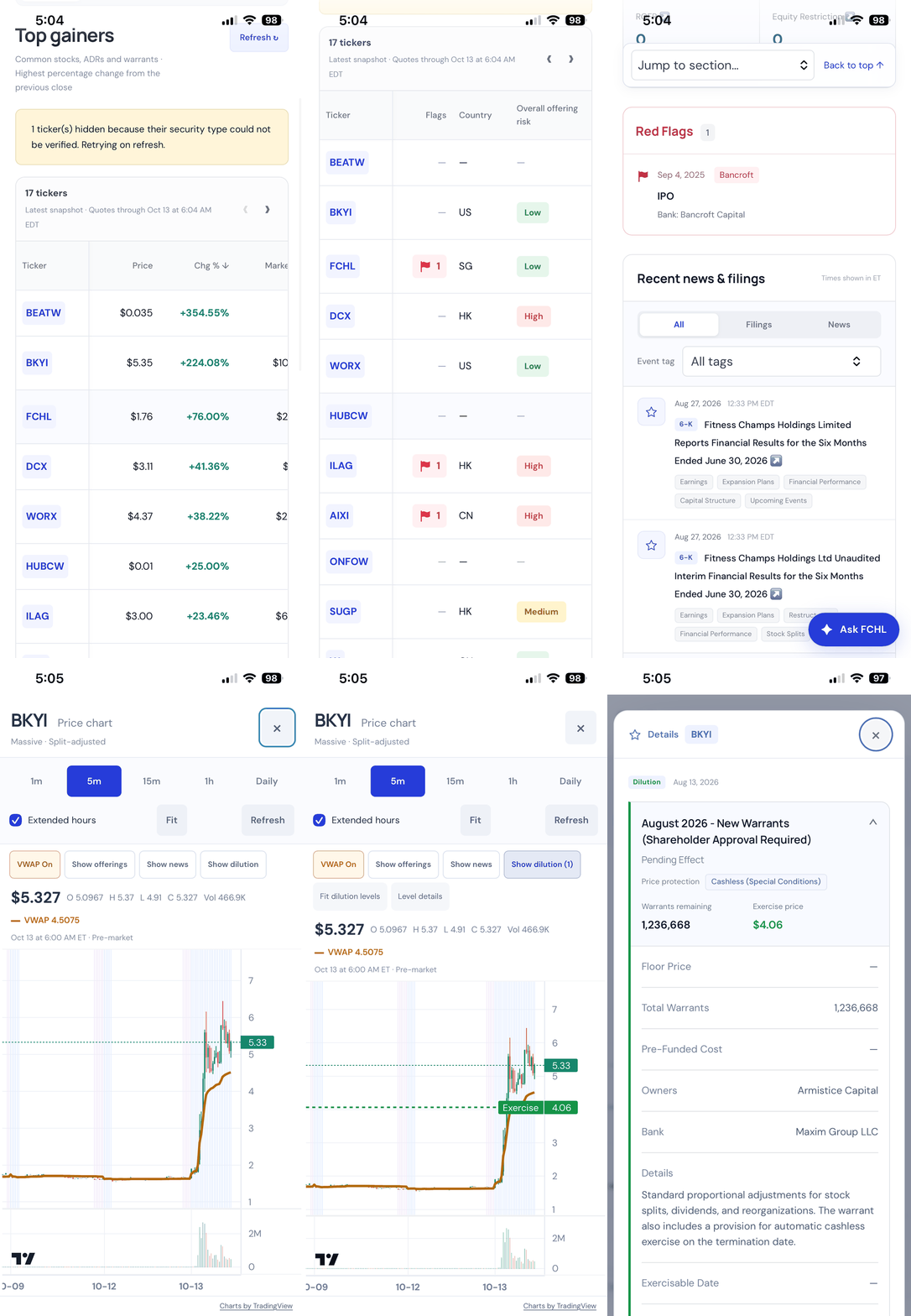
Recorded example; displayed prices, ratings, and dates are not live. The recording includes a custom chart integration; the starter defaults to embedded TradingView charts.
Start with your own API key and a small watchlist, then ask your AI assistant to add the features you want. Endpoint access follows your AskEdgar API plan, and your copy uses your API credits. The default embedded TradingView charts do not require a separate market-data API key.
Prompt for your AI coding assistant:
“Help me create my own small-cap research site from AskEdgar’s public dilution dashboard. Read the repository README, AGENTS.md, and setup guide, and use the setup path supported by my environment. Keep its existing research features. Guide me through adding my own AskEdgar API key in server-side secret settings, then verify the site with one ticker. Help me customize the layout and watchlist for my research.”
The template already caches repeated data requests. When adding features, estimate the new requests, load the records you need, and reuse cached results where appropriate. For the basic Dilution Data endpoint, show_in_play=true can significantly reduce response cost when you want records meeting its documented size and pricing criteria.
1. Create your account and API key
Create an AskEdgar account, or use the account you already have. Open the API Platform to generate your API key, manage credits, and track usage.
Paid data requests use your account’s credits. The endpoint catalog and cost estimator are public and require no API key.
Store your key in your app’s server-side secret settings. When building with AI, ask your assistant to guide you to those settings; keep the key out of prompts, public repositories, and browser-side code. The dashboard starter uses the secret name ASKEDGAR_API_KEY.
2. Estimate your first request
The free /estimate endpoint helps you plan the cost of a request. Use the companies and record limit you intend to request:
curl "https://eapi.askedgar.io/estimate?endpoint=dilution-rating&ticker=DVLT&limit=10"Read estimated_cost_dollars for the estimated cost and records_returned for the projected record count. These values reflect the estimate at request time. Actual charges depend on the data returned by your paid request.
For historical endpoints, include the supported date range. Match limit to the planned request when estimating a page of results; omitting it estimates the full matching result set. See the cost estimator reference for all options.
3. Make your first data request
Request a ticker’s Dilution Rating to see offering ability, cash need, financing frequency, and potential dilution. Paid data requests authenticate with the API-KEY header. Set ASKEDGAR_API_KEY in your server environment or secret manager before running these examples. The shell example uses Bash; the JavaScript example is for server-side Node.js 18+ (save it as first-request.mjs). Do not put the API key in client-side JavaScript.
For Python, install the dependency once:
python -m pip install requestscurl --fail-with-body "https://eapi.askedgar.io/v1/dilution-rating?ticker=DVLT&limit=10" \
-H "API-KEY: ${ASKEDGAR_API_KEY:?Set ASKEDGAR_API_KEY first}"import os
import requests
api_key = os.environ["ASKEDGAR_API_KEY"]
resp = requests.get(
"https://eapi.askedgar.io/v1/dilution-rating",
params={"ticker": "DVLT", "limit": 10},
headers={"API-KEY": api_key},
timeout=30,
)
resp.raise_for_status()
data = resp.json()
if data.get("status") != "success":
raise RuntimeError(data.get("message") or "AskEdgar request failed")
print(data)const apiKey = process.env.ASKEDGAR_API_KEY;
if (!apiKey) throw new Error("Set ASKEDGAR_API_KEY first");
const resp = await fetch(
"https://eapi.askedgar.io/v1/dilution-rating?ticker=DVLT&limit=10",
{
headers: { "API-KEY": apiKey },
signal: AbortSignal.timeout(30000)
}
);
if (!resp.ok) throw new Error(`AskEdgar HTTP ${resp.status}`);
const data = await resp.json();
if (data.status !== "success") {
throw new Error(data.message || "AskEdgar request failed");
}
console.log(data);The response wraps the data in results. This shortened example illustrates the format; the values shown are sample values, not a current quote or rating:
{
  "status": "success",
  "count": 1,
  "message": null,
  "has_more": false,
  "page": 1,
  "limit": 10,
  "results": [
    {
      "ticker": "DVLT",
      "offering_ability": "High",
      "offering_ability_desc": "Shelf Capacity: $940.00M, ATM Capacity: $13.80M, No Equity Line, No S-1 Offering",
      "dilution": "Medium",
      "offering_frequency": "High",
      "cash_need": "Low",
      "nasdaq_compliance": "Medium",
      "overall_offering_risk": "High",
      "regsho": false,
      "estimated_cash": 62490589.0,
      "cash_burn": -6502000.0,
      "cash_remaining_months": 28.83
    }
  ]
}
4. Read results and load additional pages
Data endpoints generally use the following response structure. Public tools such as the cost estimator have their own response fields, documented on their reference pages.
| Field | What it means |
|---|---|
status | "success" or "error". |
count | Number of results on this page. |
message | A response note when applicable; otherwise null. |
has_more | Whether additional pages are available. |
page | Current page number. |
limit | Records per page; check the endpoint for its defaults and maximum. |
results | The returned records, with fields specific to the endpoint. |
Handle missing data explicitly: keep null values as unavailable rather than displaying zero. Read the response message for coverage notes. Audited numeric coverage is limited to companies under $1 billion in market cap; affected fields for larger companies can be null. A request timestamp is not the timestamp of the underlying filing or market data.
For paginated results, increase page while has_more is true. For example:
/v1/dilution-data?ticker=DVLT&page=1&limit=25
/v1/dilution-data?ticker=DVLT&page=2&limit=25
Choose your next feature
| Add this feature | Use this endpoint |
|---|---|
| Float, shares outstanding, and ownership | Float & Shares Outstanding |
| A low-float scanner | Screener |
| Warrant and convertible balances and prices | Dilution Data |
| Financing participants and full price-protection terms | Dilution Data Advanced |
| Remaining shelf and ATM capacity | Registrations |
| Historical share counts for backtesting | Historical Float |
To build a filtered watchlist, follow the low-float scanner tutorial.
For a walkthrough of combining the core endpoints, use the small-cap ticker research panel guide. Browse the API directory for more research workflows.
See Authentication for key setup and Error Handling for response codes and request troubleshooting.
Updated 27 days ago